Why am I encountering the "OH SNAP", File is missing error when attempting to launch a Karaoke performance?
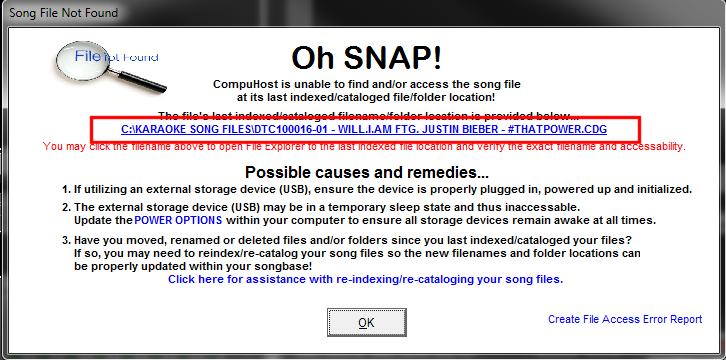
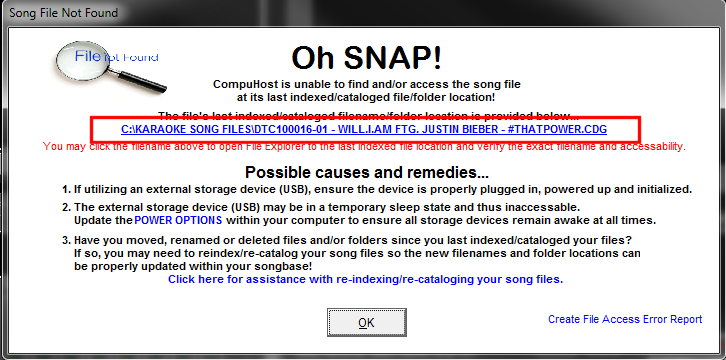
CAUSE: This error indicates that CompuHost was unable to locate and/or access the applicable song file at its last indexed/cataloged folder location and therefore unable to successfully playback the song selection.
Most often, this is the result of renaming or deleting the applicable file or altering/moving/renaming its file/folder location after it was last indexed/cataloged, or possibly forgetting to plug in and/or power up an external USB Storage Device (USB Harddrive etc.) if utilized.
VERY IMPORTANT - PLEASE READ! Please understand that CompuHost does NOT move, copy, rename or alter song files in anyway during the File Indexing/Cataloging process. Instead, the current filename and drive/folder location is simply saved (indexed) so the file may be located and accessed for playback when needed.
Therefore it is vitally important that the filenames and the drive/folder locations remain totally unchanged and the storage device containing the file remains accessable at all times!
DIAGNOSING THE CAUSE: The error message (image below) offers the last cataloged/indexed drive/folder path and filename of the file in question (outlined in RED). Therefore, when encountering the error, simply open your Windows File Explorer and try locating the file at its exact cataloged location and filename. If you're unable to find the file, CompuHost won't be able to either.
RESOLUTION: If you have renamed, deleted, moved or altered the file path (renamed folders etc.) of any song files since they were last cataloged/indexed, you'll need to reindex/recatalog the file(s) so their new revised filenames and/or folder locations (file path) can be updated within the songbase for future access. Please reference the built-in CompuHost Help System (Top Main Menu->Help->CompuHost Help) under the topic "Getting Started->Indexing/Cataloging Existing Karaoke Content Files" for user instructions.