Not hearing any sound/audio out of speakers during Karaoke playback?
Please be reminded that CompuHost, unlike other less advanced applications (Windows Media Player etc.), supports multiple and separate sound devices and output ports, therefore it's important to have the proper sound device and output port configured within CompuHost.
The TWO most common causes of "No sound during playback" are...
1. Misconfigured Sound Device and/or Output Port.
- Launch CompuHost
- Select "File-System Devices and Options" from the Top Main Menu.
- Click the button labeled "Audio Device Setup"
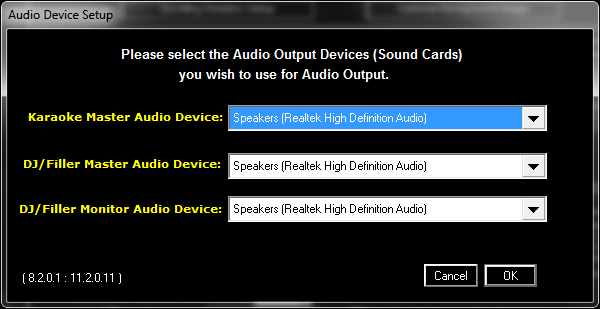
- Ensure the correct Audio Device is selected for each player.
- Click OK.
2. If utilizing an HDMI connected device (TV etc.), it's possible that the sound/audio is getting routed to the HDMI device instead of your computer speakers or audio output port as intended.
If the HDMI device is set as the default system audio device (regardless of the setting within CompuHost), all sound/audio may be errantly routed through the HDMI output, instead of the intended sound device and/or port (computer speakers, audio line out etc.).
Follow the steps below to set the intended device as the Default Device:
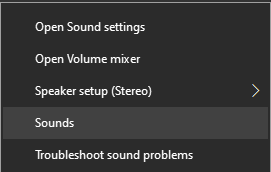
- Right-click on sound volume icon in the lower right corner of Windows. A context menu will pop up.

- Select "Sounds".
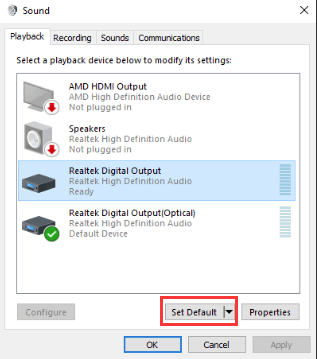
- In the Playback tab, select the desired audio output device option. Click Set Default and click OK.
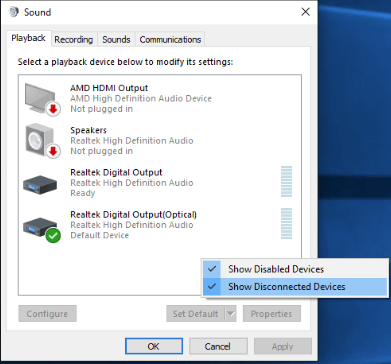
HINT: If you do not see the Digital Output Device or HDMI option in the Playback tab, right click on the blank place, then click Show disconnected devices and Show disabled devices on the context menu. Then select and set the correct default device.